


If you’ve been hearing more about WCAG 2.1 Level AA compliance, you’re not alone. Between legal concerns, accessibility awareness, and client questions, it’s quickly becoming something business owners can’t ignore.
But most explanations are… a lot. 😅
So let’s break it down in a way that actually makes sense:
👉 What it is
👉 What’s required
👉 Whether there are real deadlines
👉 And what the risks actually look like
What is WCAG 2.1 Level AA? (Quick Recap)
WCAG stands for Web Content Accessibility Guidelines, and Level AA is the most commonly expected standard for business websites.
It focuses on making your website accessible to people with:
- Visual impairments
- Hearing impairments
- Motor limitations
- Cognitive differences
In plain terms:
Your website should be usable by as many people as possible, not just the average user.
Are There Official Deadlines for WCAG Compliance?
This is where things get confusing.
👉 There is no single universal deadline for all businesses.
However:
- Government websites and organizations often have strict deadlines
- Private businesses fall under broader laws like the Americans with Disabilities Act (ADA)
- Courts are increasingly interpreting ADA to include websites
So while there isn’t a “drop-dead date” for everyone… Enforcement is already happening.
What Are the Actual Requirements?
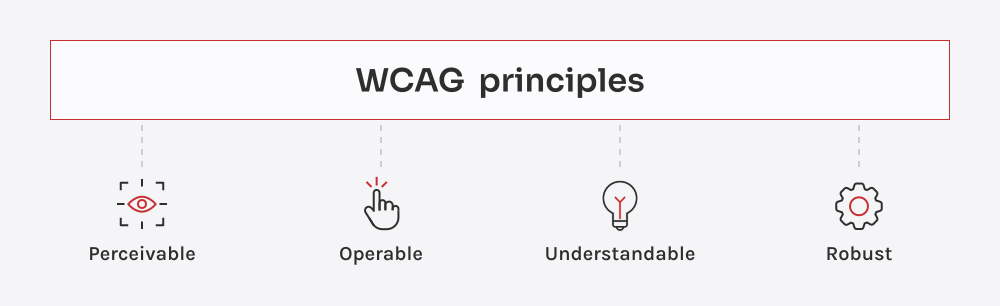
WCAG 2.1 Level AA is built around four core principles:
1. Perceivable
Users must be able to see or hear your content
Examples:
- Text alternatives for images (alt text)
- Captions for videos
- Proper color contrast
2. Operable
Users must be able to navigate your site
Examples:
- Full keyboard navigation
- No elements that require a mouse only
- Clear, usable menus
3. Understandable
Your site should be easy to read and use
Examples:
- Clear instructions on forms
- Predictable navigation
- Simple, readable language
4. Robust
Your site must work with assistive technologies
Examples:
- Screen reader compatibility
- Clean, structured code
- Proper labeling of buttons and fields
The key takeaway: Accessibility is not one feature—it’s how your entire website is built and structured.
What Happens If You’re Not Compliant?
This is the part most people are worried about.
⚠️ Potential Risks:
- ADA-related lawsuits
- Demand letters from law firms
- Required remediation (often on a deadline)
- Legal fees and settlements
And yes—this is happening more frequently, especially for:
- Healthcare providers
- Service-based businesses
- E-commerce websites
Important note: Most lawsuits are not about perfection—they’re about lack of effort.
Legal risks: lawsuits, fines, and regulatory enforcement
Many jurisdictions, including the EU, the U.S., the UK, and Canada, enforce digital accessibility laws.
- EU: The Web Accessibility Directive (WAD) and the European Accessibility Act impose strict requirements for public sector websites.
- U.S.: The Americans with Disabilities Act (ADA) and Section 508 mandate accessibility for websites and digital services, with lawsuits as a significant enforcement mechanism.
- UK: The Equality Act and the Public Sector Bodies regulations require accessible websites for public bodies, with ongoing enforcement of WCAG standards.
- Canada: The Accessible Canada Act and provincial laws like the Accessibility for Ontarians with Disabilities Act (AODA) require that websites be made accessible, with potential legal action for non-compliance.
Regulatory penalties and market restrictions
While fines for non-compliance vary by country, enforcement is anticipated to be as strict as GDPR, with severe penalties for failure to meet accessibility requirements. Thus, starting in June 2025, businesses offering digital products and services in the EU must meet accessibility standards. Non-compliance can lead to market restrictions, meaning companies may not be allowed to operate in the EU market.
Do You Need to Be 100% Compliant?
Real talk: Almost no website is perfectly compliant.
Even large companies are constantly improving.
What matters more is:
- Making reasonable improvements
- Following best practices
- Showing good-faith effort
What Should Small Businesses Actually Do?
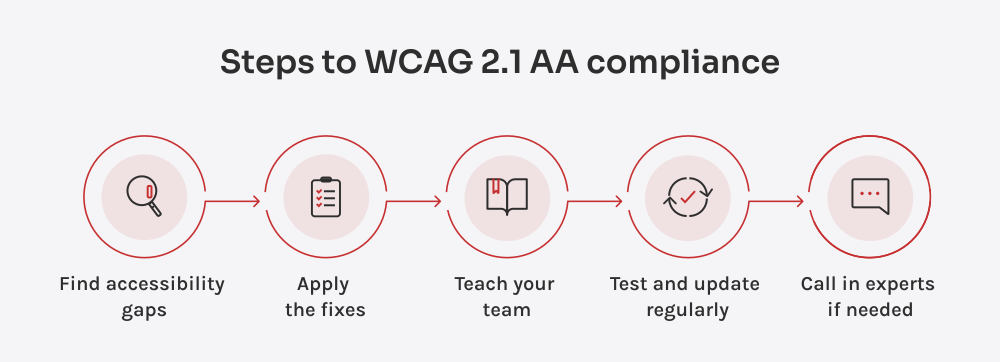
Instead of trying to fix everything overnight:
Start here:
- Improve text contrast and readability
- Add alt text to images
- Fix obvious navigation issues
- Ensure forms and buttons are labeled clearly
- Avoid relying solely on accessibility widgets
Small, strategic improvements go a long way.
Why This Feels So Overwhelming (And What Helps)
If you’ve looked into WCAG before, you’ve probably felt:
- Confused by technical language
- Unsure what actually applies to you
- Pressured to “fix everything” immediately
And that’s exactly where guidance matters.
Where I Come In
This is a perfect example of something that sounds like a tech problem…
but is really a strategy + prioritization problem.
I help small business owners:
✔ Understand what WCAG actually means for their site
✔ Identify the highest-impact fixes
✔ Avoid wasting money on unnecessary solutions
✔ Improve accessibility without rebuilding everything
Because just like marketing or tech tools…There is no one-size-fits-all solution.
Final Thoughts: Accessibility is a Direction, Not a Destination
WCAG 2.1 Level AA isn’t about checking a box.
It’s about:
- Making your website more inclusive
- Reducing risk
- Creating a better experience for all users
And most importantly: Taking intentional steps forward, not chasing perfection.
Feeling unsure where your site stands?
Let’s take a look together and map out a plan that actually makes sense for your business.

